
Who came to the gate today?
Visitors and deliveries with times and snapshots.
Homes and communities
An independent house with a few cameras. Who came to the gate, when the help arrived, and anything that moved at night.
FOXcam – Shop / supermarket
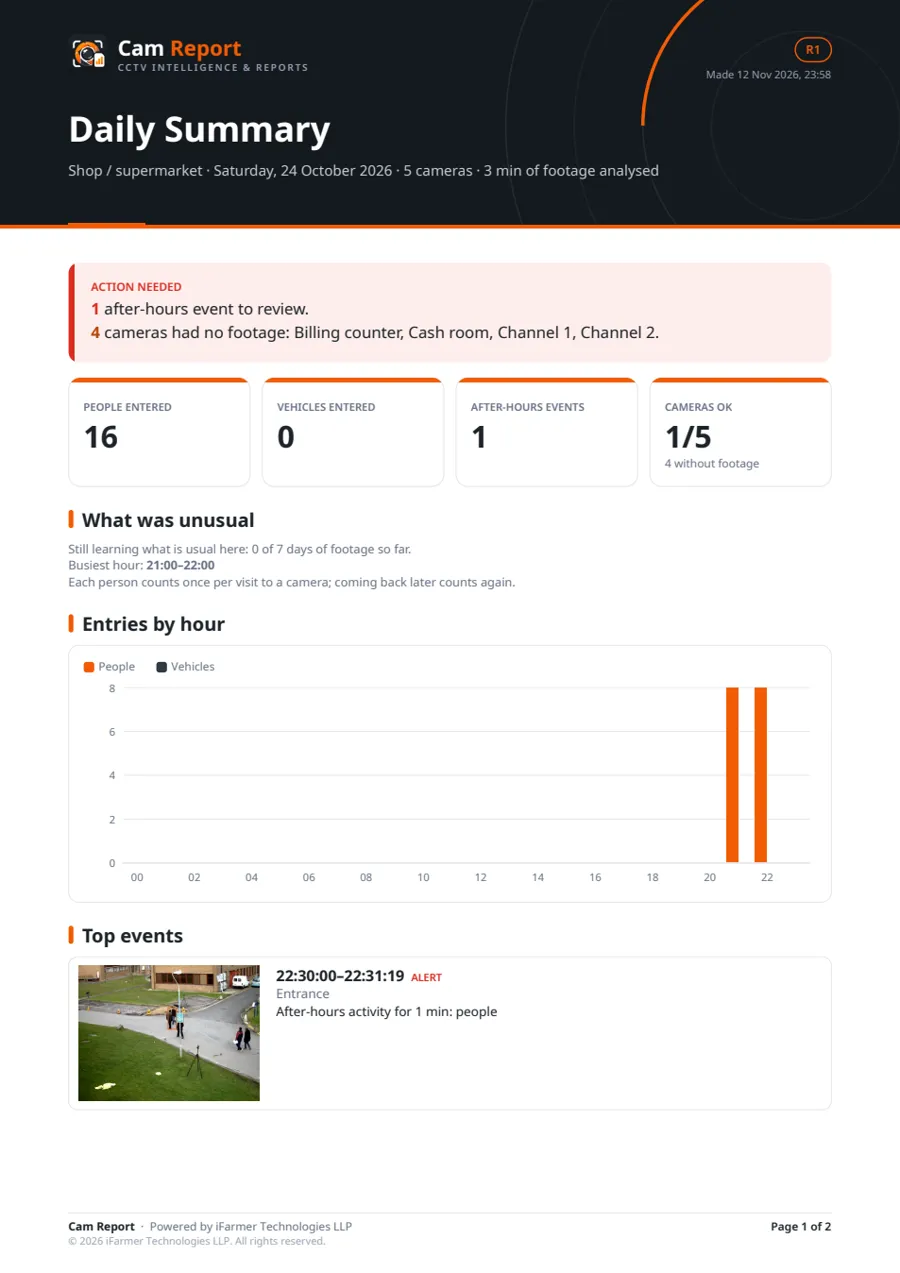
Daily summary · 24 Oct 2026
👥 People entered: 16
🚗 Vehicles entered: 0
⏰ Busiest hour: 21:00
🌙 After-hours events: 1
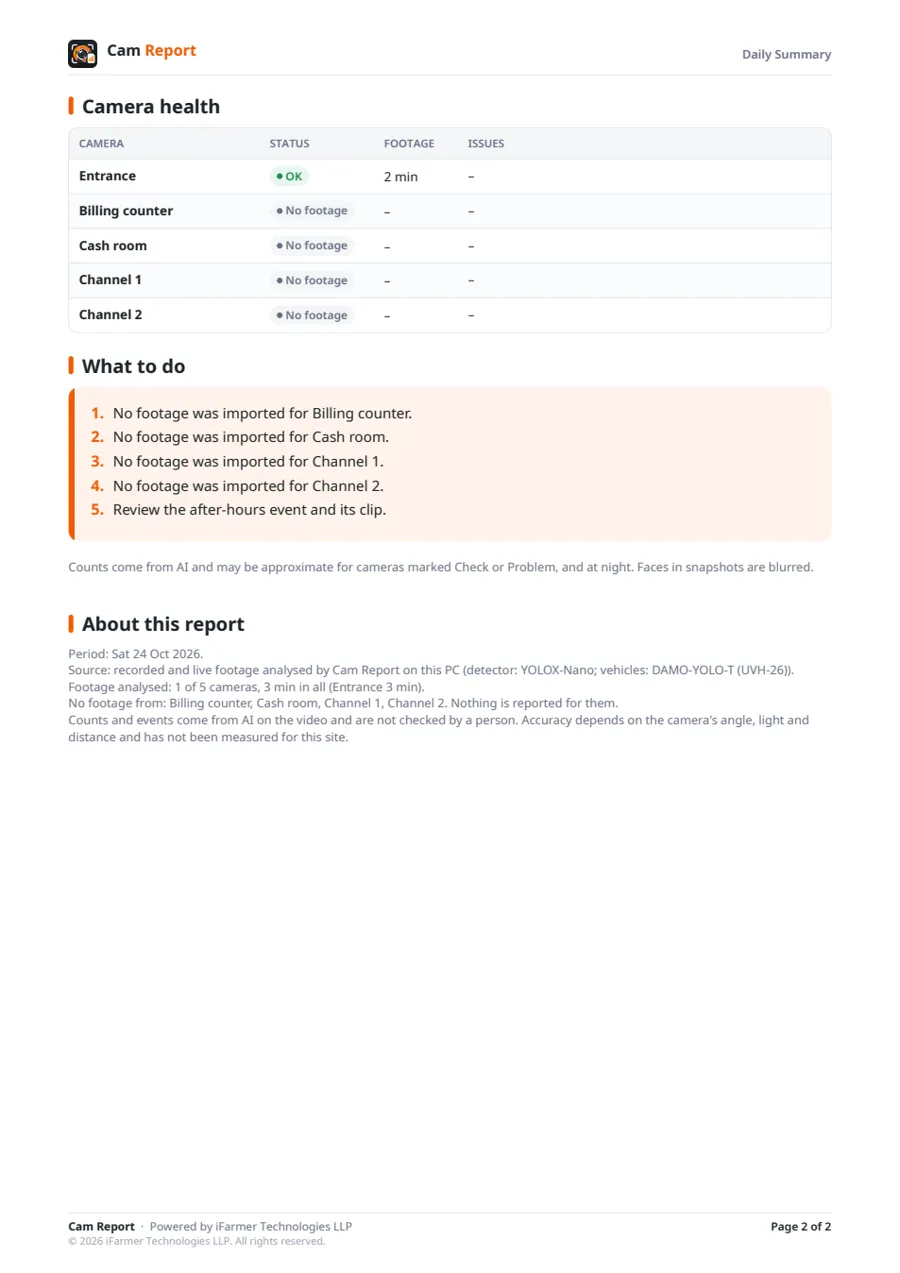
📷 Cameras working: 1/5 · no footage: 4
⚠️ Needs attention:
• 22:30 Entrance – After-hours activity for 1 min: people
• Billing counter, Cash room, Channel 1, Channel 2: no footage
🛍️ Shop floor:
• Came in 16 → Stayed 14
Full report attached (PDF).
07:00 ✓✓
Daily Summary, Event Log and After-Hours for every site, more than 90 others for your kind of business, in English, Tamil and Hindi for the Daily Summary.
Sample report generated using demonstration footage: a 3-minute test run on a public clip, so 4 of its 5 cameras show no footage. It is not a customer's report; reports for your site come from your own recordings.
Visitors and deliveries with times and snapshots.
Crossings of the boundary line you draw, with an alert and a photo.
Domestic help entries and exits by day.
These are switched on when you choose this business type. Add or remove any of them in Settings.
Daily Summary
Was everything all right? Key counts, the top events, camera problems and three highlights, in one page.
Category: Operations
Event Log
Every event with its time, camera, type, snapshot and a link to the clip.
Category: Security
After-Hours Activity
Any movement while the premises were closed, with clips.
Category: Security
Video Summary Clip
24 hours of one camera in a few minutes.
Category: Operations
Camera Health
Gaps in recording, blurry, dark, covered or moved cameras.
Category: Camera health
Alert Response
Alerts sent, how fast someone answered, and false alarms per camera.
Category: Security
Visitor Log
Each visitor with entry and exit time, a snapshot and their vehicle if any.
Category: Security
Perimeter and Line Crossing
Crossings of fences, walls or boundary lines you draw.
Category: Security
Loitering
People staying in one area longer than the limit you set.
Category: Security
Left and Removed Objects
Bags left behind, and things that disappeared from an area.
Category: Security
Fire and Smoke
Possible smoke or flame, with the clip.
Category: Safety
Falls, Fights and Running
Unusual movement such as a fall or people running.
Category: Safety
Deliveries and Domestic Help
Every delivery and staff entry, by day.
Category: Security
Delivery Riders
Delivery riders by hour, how long they stayed, and riders while closed.
Category: Operations
Any that record. It pulls footage straight from Hikvision, Dahua and CP Plus recorders over your network, and records the live stream of most IP cameras, including EZVIZ, Uniview, TVT, Imou and Tapo. For anything else, export the footage to a pen drive and drop the files in.
Not for analysis. In the standard setup all analysis runs on your own PC or FOXcam Box, and recordings are not uploaded. Some things do use the internet: reports and alerts, with their photos, go to the WhatsApp numbers and email addresses you choose, and the licence check reaches our server. If you watch from outside the site on your phone or browser, the video passes through our server in India, which is not designed to store it.
People and vehicle counts are approximate, especially at night or in crowds, and the reports say so. Some checks, such as fire, falls, safety gear and theft review, flag moments for a person to look at. They are aids for review, not proof.
It depends on the number of cameras and the reports you need. Contact us and we will send you a quote.


